

For Android 8 and above
The option (Settings) may slightly differ based on the device version or device model.
non-Samsung devices:
1. Launch your device's Settings
2. Tap on the security (& privacy)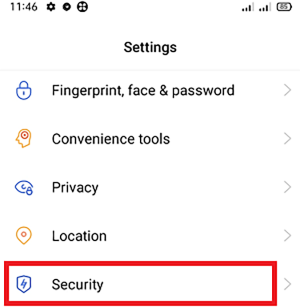
3. Under the APP INSTALLATION section, click on Unknown source installations.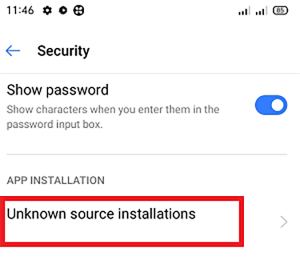
4. Select your preferred browser (such as Google Chrome or Mozilla Firefox) using which you want to download the APK files.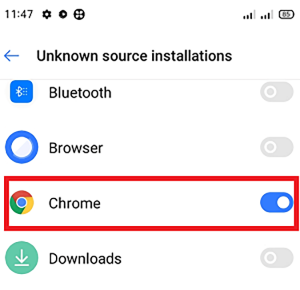
5. Enable the toggle button that allows app installs.
On Samsung devices:
1. Launch your phone's Settings
2. Go to Biometrics and security and tap on the Install unknown apps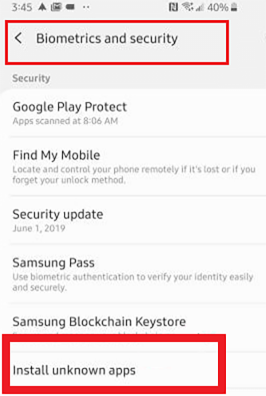
3.Select your preferred browser (Samsung Internet, Chrome or Firefox) using which you want to download the APK files.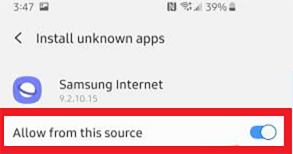
4. Enable the toggle to installs apps.
For versions earlier than Android 8
1. Launch the device's Settings
2. Tap on the Security.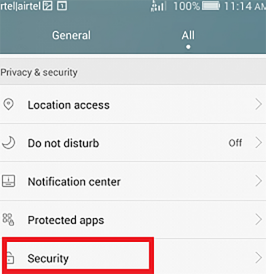
3. Under the Device administration section, toggle the Unknown sources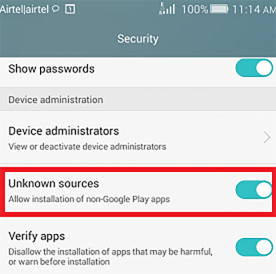
Лучшие приложения

Audiomack: Music Downloader
Музыка и аудио
Drawing Desk: Draw, Paint Art
Искусство и дизайнGoogle Maps Go
ПутешествияSimply Piano: Learn Piano Fast
ОбразованиеBigo Live - Live Streaming App
СоциальныеApple Music
Музыка и аудиоMoonly: Moon Phases & Calendar
Стиль жизниGalleryit - Photo Vault, Album
Фотография